301 vs 302 Redirects: Which One to Use for SEO
Use a 301 for permanent moves and a 302 for temporary ones. Here is the side-by-side table, the cases where each is the wrong pick, and a simple way to choose.

Try the free redirect checker
Free, no sign-up. Then let Rankfly research, write and publish the articles that rank.
Use the free toolKey takeaways
- Use a 301 when a page has moved for good and a 302 when the original URL will come back.
- The main SEO difference is which URL Google keeps in its index, not whether link equity passes.
- A 302 left in place for a permanent move is the most common redirect mistake.
- A 301 used for a short test or promo can drop your original page from search results.
- Always check the real status code with a redirect checker after you set a redirect up.
Table of contents
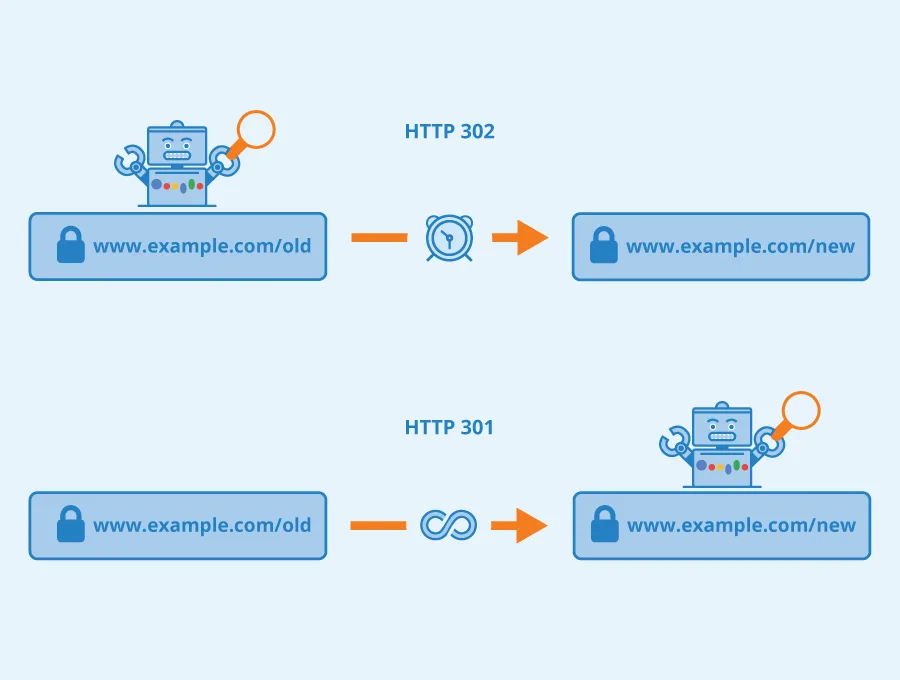
Use a 301 redirect when a page has moved for good, and use a 302 redirect when the move is temporary and the original URL will come back. The wrong choice rarely wrecks rankings overnight, but it tells Google to index the wrong URL, and that is where the real SEO cost sits.
This guide gives you the verdict, a side-by-side table, and a clear look at when each redirect is the wrong tool.
301 vs 302 redirect: the short answer
A 301 redirect is a permanent redirect: it tells browsers and search engines that a URL has moved for good and the new URL should replace it. A 302 redirect is a temporary redirect: it tells them the move is short term and the original URL is still the one that matters.
Here is the whole comparison in one table.
| 301 redirect | 302 redirect | |
|---|---|---|
| Meaning | Moved permanently | Moved temporarily |
| Status line | 301 Moved Permanently | 302 Found |
| Signal to Google | Index the new URL | Keep the original URL indexed |
| Link equity | Passes to the new URL | Google has said it passes too, but the old URL usually stays in the index |
| Typical use | Domain change, URL restructure, merged pages, HTTP to HTTPS, www to non-www | A/B tests, maintenance pages, seasonal promos, short-term campaigns |
| Wrong when | The move is only for days or weeks | The move is permanent |
| Browser caching | Browsers tend to cache it for a long time, so reversing it is slow | Usually not cached for long, so easy to reverse |
| Remove later? | No, keep it as long as old links exist | Yes, once the temporary reason ends |
If you remember one rule, make it this one: permanent move, 301. Temporary move, 302.
What is a 301 redirect?
A 301 redirect sends visitors and search engines from an old URL to a new one and says the change is permanent. If a page moves from example.com/old-page to example.com/new-page, a 301 makes sure everyone lands on the new address.
Use a 301 in these cases:
- Domain change or rebrand. Every old URL should point to its equivalent on the new domain.
- URL restructure. You changed slugs or folders and the old addresses should no longer be used.
- Merged content. Two similar pages become one, and the weaker URL points to the stronger one.
- Canonical versions of your site. HTTP to HTTPS and www to non-www should be 301s.
- Deleted pages that have a close replacement. Send visitors to the nearest equivalent page.
The key condition is relevance. Sitebulb's redirect guide makes the point that the destination should be a genuine equivalent of the source, because redirecting to something unrelated will not preserve the value of the old page.
What is a 302 redirect (HTTP response 302)?
HTTP response 302 is the status code a server sends to say a resource has been temporarily moved to a different URL. The browser follows it to the new address, but the original URL stays the one that counts.
In SEO terms, a 302 says "this is a detour, not a new home." Good uses include:
- A/B tests. Send part of your traffic to a variant page while keeping the original URL as the real one.
- Maintenance. Point visitors to a temporary page while you fix the original.
- Seasonal or limited promotions. Rank Math's own example is its pricing page redirecting to an offer page during a sale, then going back.
- Short-term campaigns. Any case where you plan to remove the redirect on a known date.
A 302 is the right tool only when you genuinely intend to undo it.
Do 301 and 302 redirects both pass link equity?
This is where most articles contradict each other, so here is the honest picture. Some guides say a 302 passes no link equity at all. Sitebulb's guide says that after Google's Gary Illyes confirmed in 2016 that 302s pass PageRank, independent evidence has largely caught up with the claim, and SimpleTiger also states that both pass link equity.
So do not choose between them based on a fear that a 302 "loses" your links. The practical issue is different: the redirect type changes which URL Google treats as the main one.
- With a 301, Google is told to move to the new URL and show it in results.
- With a 302, Google is told the original URL is still the real page, so it tends to keep that URL indexed.
That means a 302 used for a permanent move keeps pointing Google at the old address, which is the opposite of what you want. The reverse mistake is just as real, and we cover both below.
Which URL does Google index after each redirect?
After a 301, Google generally replaces the old URL with the new one in its index over time. After a 302, Google generally keeps the old URL and treats the destination as a temporary stand-in.
This matters for three things you can see in practice:
- What shows in search results. The indexed URL is the one that appears.
- Where ranking signals consolidate. They gather on the URL Google picks as canonical.
- Which URL your sitemap and internal links should use. After a 301, update both to the new URL. After a 302, keep the original.
If you want to confirm what a page declares as its canonical, run it through the free canonical tag checker. Redirects and canonical tags are both signals, and they should agree with each other.
When a 301 is the wrong choice
A 301 is wrong whenever you plan to bring the original URL back. These are the common traps:
- A/B tests. If you 301 your page to a test variant, you tell Google the original is gone. Use a 302, or better, test without redirecting at all.
- Short sales and seasonal pages. A 301 from your product page to a Black Friday page can push the product URL out of results. When the sale ends, you have to undo a redirect browsers may have cached.
- Maintenance windows. Sending your key pages to a holding page with a 301 risks Google swapping them out for a page you never wanted indexed.
- Redirecting unrelated pages to the homepage. Even with the right code, a mismatched destination does not carry over the value of the old page. If no close equivalent exists, a 404 or 410 can be more honest than a lazy redirect.
- Testing a new domain. If you are not sure the migration is final, do not publish permanent signals yet.
Because browsers cache 301s aggressively, reversing a wrongly placed 301 is slower than reversing a 302. Think before you ship one.
When a 302 is the wrong choice
A 302 is wrong whenever the move is permanent. This is the more common mistake, because many CMS plugins, site builders and server setups default to a 302.
- Domain migrations. A 302 from the old domain keeps telling Google the old URLs are the real ones.
- HTTP to HTTPS and www to non-www. These are permanent canonical choices and should be 301s.
- Merged or deleted pages. If the old page is never coming back, use a 301 to the closest equivalent.
- Temporary redirects that became permanent. A "temporary" redirect that sits in place for months is a permanent redirect with the wrong label. The GenieLab guide warns that Google may eventually treat a long-running 302 as permanent anyway, so you lose control of the outcome either way.
The fix is simple: audit your redirects, find any 302 that has no end date, and switch it to a 301.
What about 307 and 308 redirects?
A 307 is the stricter version of a 302, and a 308 is the stricter version of a 301. Both keep the original HTTP request method (for example POST staying POST), while 301 and 302 can change it.
| Code | Meaning | Keeps request method | Plain-English use |
|---|---|---|---|
| 301 | Moved permanently | Not guaranteed | Standard permanent move |
| 302 | Found (temporary) | Not guaranteed | Standard temporary move |
| 307 | Temporary redirect | Yes | Temporary move where method must not change |
| 308 | Permanent redirect | Yes | Permanent move where method must not change |
For ordinary page moves on a business website, you do not need to worry about 307 and 308. Rank Math's guide says the same: the 302 is the common one, so you do not need to worry about the technical nuance of the 307. If you want the details, Kinsta has a clear explainer on the 307 redirect.
Neil Patel's short video covers the 301 vs 302 difference if you prefer to watch it explained.
How to set up a 301 or 302 redirect
The method depends on your platform. The status code is what matters, not the tool.
In WordPress with a plugin
Plugins like Rank Math include a redirections module. Per Rank Math's redirection setup guide, you enable the module, click Add New, enter the source and destination URLs, and choose either 301 Permanent Move or 302 Temporary Move as the redirection type.
In .htaccess on Apache
A permanent redirect looks like this:
Redirect 301 /old-page https://example.com/new-page
A temporary one only changes the code:
Redirect 302 /old-page https://example.com/temporary-page
On Shopify, Webflow, Wix and similar platforms
Most site builders have a URL redirect screen in settings. Look at the options it gives you, because some only create permanent redirects and some default to one type. If a platform offers no choice, check what it actually returns using the next section.
How to check which redirect you actually have
Do not trust the setting you clicked. Check the real response. A redirect checker follows the URL and shows each hop with its status code, so you can see a 301, a 302, a chain, or a loop at a glance.
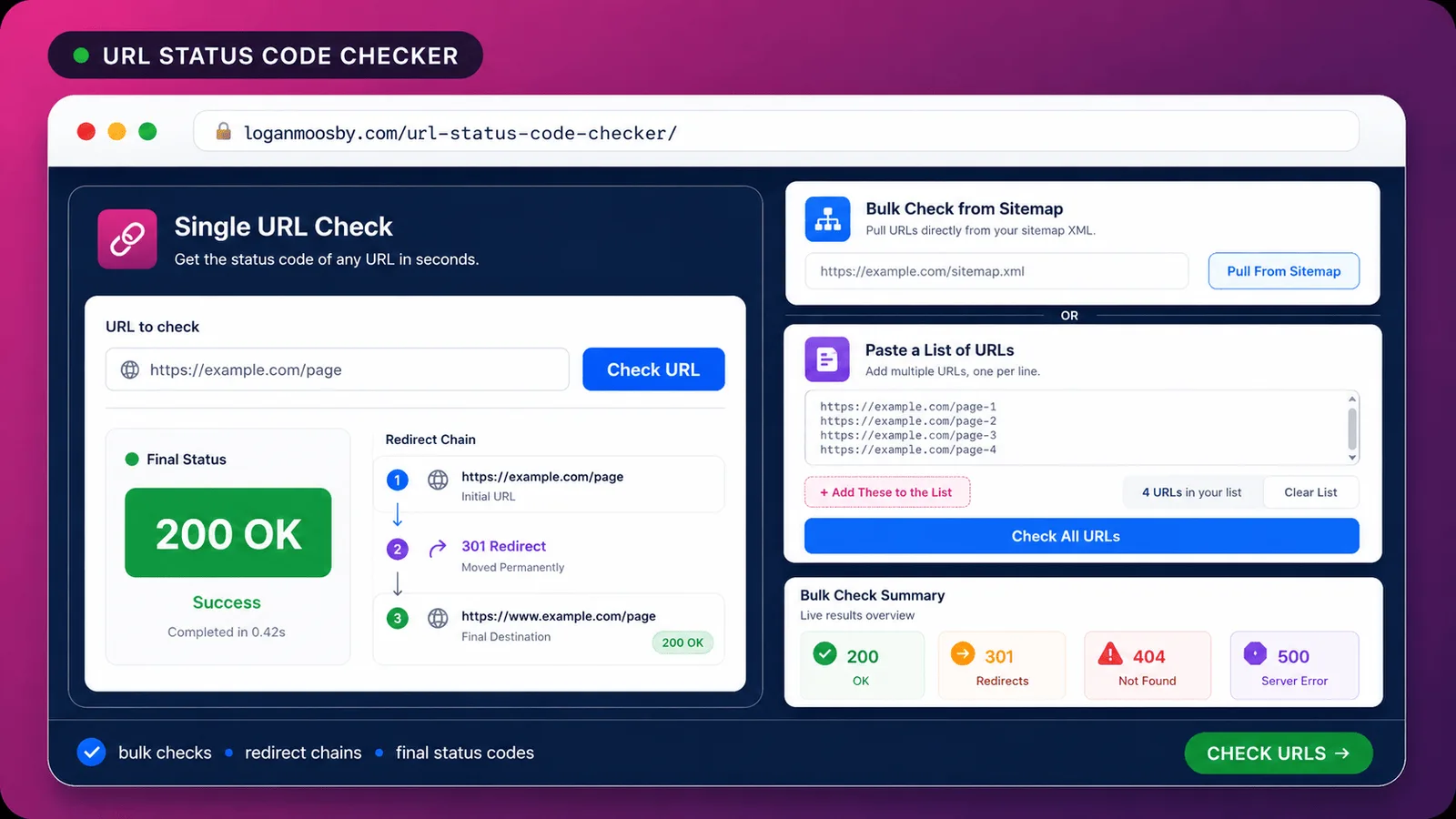
When you test a URL, look for these things:
- The first status code. It should be 301 for permanent moves and 302 for temporary ones.
- The number of hops. One hop is ideal. Two or more is a redirect chain.
- The final destination. It should return a 200 and be the page you meant.
- Consistency. HTTP, HTTPS, www and non-www versions should all end on the same final URL.
If you want to see the raw headers too, the free HTTP header checker and HTTP status code checker show exactly what your server returns. Rank Math also documents how to trace a URL's redirects inside WordPress.
Common redirect mistakes that cost you traffic
Most redirect problems come from a short list of habits.
- Using a 302 for a permanent move. The most common one, and the easiest to fix.
- Redirect chains. A goes to B, B goes to C. Point A straight to C instead.
- Redirect loops. A goes to B and B goes back to A. Visitors see an error and Google gives up.
- Redirecting everything to the homepage. It confuses users and rarely preserves the value of the old page.
- Forgetting internal links. After a 301, update your own links and your sitemap so they point to the final URL. The free internal link checker and XML sitemap validator help you spot leftovers.
- Removing a 301 too early. Keep it as long as old links or bookmarks might still point to the old URL.
- Using JavaScript or meta refresh redirects when a server redirect is possible. Onely has a guide on JavaScript redirects and SEO if a server-side redirect truly is not an option. Server-side 301 and 302 redirects are the cleaner choice.
After any big move, also scan for dead ends with a broken link checker.
Which should you choose? A decision table
Find your situation and use the matching redirect.
| Your situation | Use | Why |
|---|---|---|
| Changing your domain name | 301 | The move is final and every URL should transfer |
| Switching from HTTP to HTTPS | 301 | A permanent canonical choice |
| Merging two similar blog posts | 301 | The weaker URL is retired for good |
| Changing a product or service URL slug | 301 | The old slug is not coming back |
| Running an A/B test on a landing page | 302 | The original URL stays the real page |
| Sending visitors to a maintenance page | 302 | You will remove it when work ends |
| Running a two-week sale page | 302 | The product page returns afterward |
| Discontinued product with a close replacement | 301 | Send visitors to the nearest equivalent |
| Discontinued product with no replacement | 404 or 410 | A forced redirect to an unrelated page helps nobody |
| Not sure how long the move lasts | 302 first, then switch to 301 once it is final | Avoids sending a permanent signal too early |
If you run a small business site
Most of your redirects will be 301s: a new URL structure, a renamed service page, a merged post. Use a 302 only for short promos and maintenance. Our SEO guide for small businesses covers the rest of the basics.
If you run an online store
Products come and go, so you will make many calls like these. Redirect retired products to the closest equivalent with a 301, and use a 302 for limited-time landing pages. The same thinking shows up in our page on SEO for online stores.
If you are a marketer running tests
Use a 302 for tests and campaigns, set a removal date, and write it down. A redirect nobody remembers becomes a permanent redirect with the wrong code.
If you are migrating a site
Use 301s, map old URLs to their closest new equivalents one by one, and test the result with a redirect checker before and after launch.
Where Rankfly fits
Redirects protect the pages you already have. They do not bring in new visitors. Once your redirects are clean, the next job is publishing new content that ranks on Google and gets quoted by AI assistants.
That is what Rankfly does. It researches the current top results for a keyword, then writes and publishes one SEO article a day in your brand's voice, so you are not doing the SEO work yourself. It costs $66/month for 30 articles, with a 3-day free trial. It is not a technical SEO suite, so keep using a redirect checker and crawler for site migrations.
Final thoughts
Use a 301 for permanent moves and a 302 for temporary ones, and the choice is almost always clear. The costly errors are a 302 left in place after a permanent change and a 301 used for something you meant to undo. Run your important URLs through a redirect checker today and fix any that return the wrong code.
Frequently asked questions
What is the difference between a 301 and 302 redirect?
A 301 redirect is permanent and tells Google to index the new URL. A 302 redirect is temporary and tells Google to keep the original URL as the main page. Use a 301 when a page has moved for good and a 302 when you plan to bring the original back.
What are redirects in SEO?
Redirects send visitors and search engines from one URL to another. In SEO they keep old links and rankings useful after you move, merge or delete pages, and they stop users hitting dead ends. The type you pick, such as 301 or 302, tells search engines whether the move is permanent.
What is HTTP response 302?
HTTP response 302 is the status code a server returns to say a page has temporarily moved to another URL. The browser follows it to the new address, but the original URL remains the one search engines treat as the real page. It is the standard code for temporary redirects.
What is 302 in SEO?
In SEO, a 302 is a temporary redirect that signals the original URL should stay indexed. It suits A/B tests, maintenance pages and short promotions. Using it for a permanent move is a mistake, because Google keeps pointing at the old URL.
Does a 302 redirect hurt SEO?
Not when it is used for a genuinely temporary move. It hurts when you use it for a permanent change, because the old URL stays indexed and the new one may not replace it. If a 302 has no end date, switch it to a 301.
Can I change a 302 to a 301 later?
Yes, and it is a common fix once a temporary move becomes permanent. Change the redirect type, update your internal links and sitemap to the new URL, then check the result with a redirect checker. Going the other way, from 301 to 302, is slower because browsers often cache 301s.
About the editorial team
Emma writes Rankfly's guides on SEO, AI search and getting small businesses found on Google and ChatGPT.