Claude vs ChatGPT for Writing Blog Posts: Which Wins?
Claude and ChatGPT are both strong writing tools. Here is how they differ for blog posts, what each costs, and which one fits your workflow.

30 SEO articles a month, done for you
Keyword research, writing, publishing and AI visibility tracking for $66/month. 3-day free trial.
See pricingKey takeaways
- Reviewers consistently find Claude's long-form prose more natural, while ChatGPT is stronger for brainstorming, short copy and extras like image generation.
- Claude Pro and ChatGPT Plus both cost $20/month, so price rarely decides it; usage limits and workflow do.
- Both tools have web search and deep research, but neither one plans keywords, tracks rankings or publishes for you.
- The best test is your own: run the same brief through both and compare the drafts side by side.
- If your goal is a steady flow of published SEO articles, a purpose-built tool saves more time than picking the better chatbot.
Table of contents
Claude is the better pick for long-form blog drafts, and ChatGPT is the better pick for brainstorming, short copy and an all-in-one toolkit. Reviewers who compared them in 2026 describe the top models as close to parity, so the real difference is writing voice, features and usage limits, not raw intelligence.
This guide pulls together what Zapier, XDA Developers and a working creator reported, adds a copy-paste brief you can run through both tools, and ends with what neither chatbot does for an SEO blog.
Claude vs ChatGPT at a glance
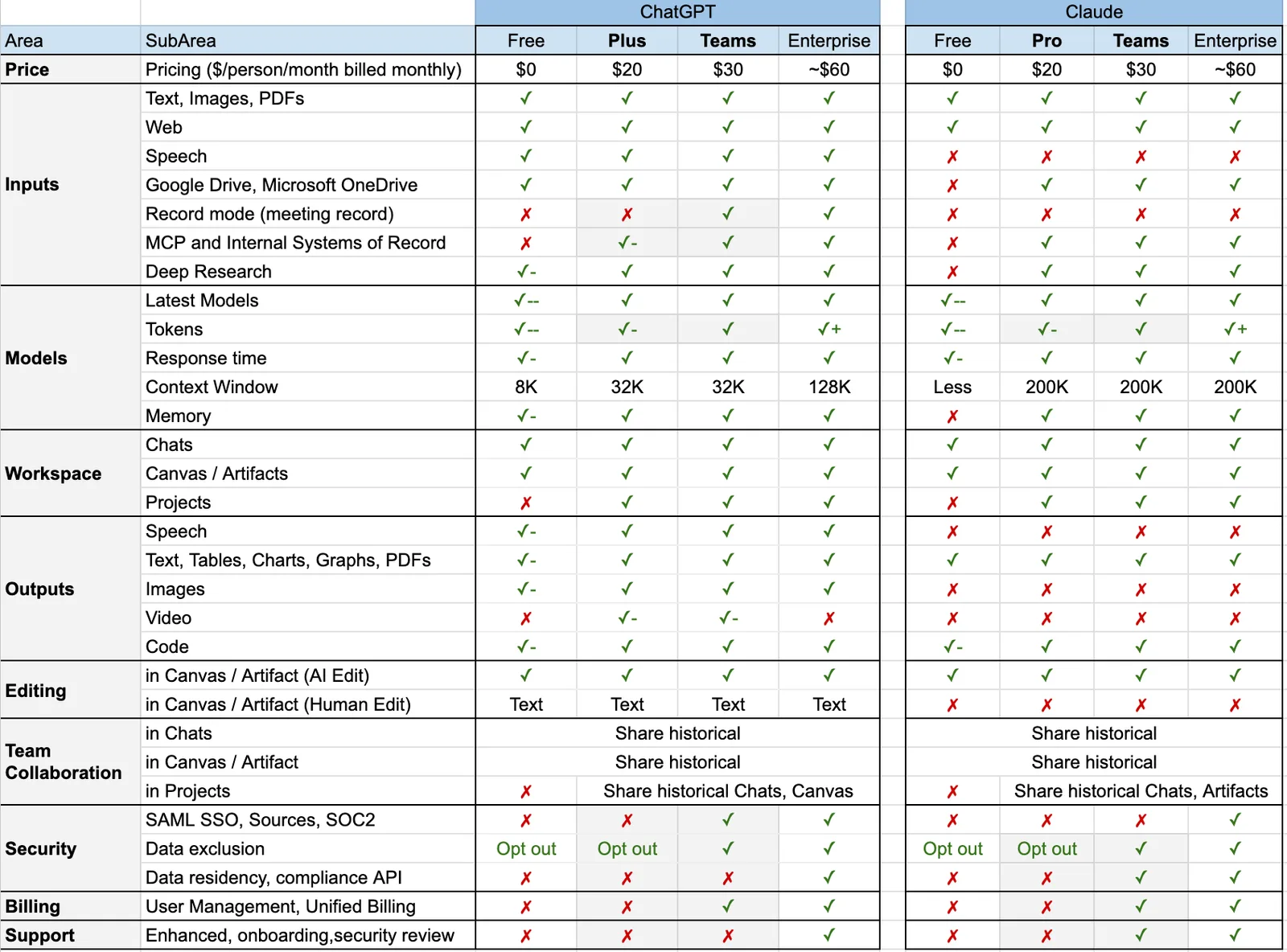
The table below uses the feature and pricing comparison from Zapier's Claude vs. ChatGPT review. Plans and prices change often, so check each vendor's pricing page before you buy.
| Claude (Anthropic) | ChatGPT (OpenAI) | |
|---|---|---|
| Context window | Up to 1M tokens | Up to 1M tokens |
| Web search | Yes | Yes |
| Deep research | Yes | Yes |
| Image generation | No | Yes |
| Voice mode | Yes | Yes |
| Coding tool | Claude Code | Codex |
| Paid plan | Pro $20/month; Max $100 or $200/month | Go $8/month (with ads); Plus $20/month; Pro from $100/month |
| Team plan | $25/user/month | $20/user/month, billed annually |
| Best for blog writing | Long-form drafts, editing, analysis of long documents | Brainstorming, short copy, headlines, all-in-one use |
The entry paid tiers are priced the same: Zapier lists both Claude Pro and ChatGPT Plus at $20 per month.
Which writes better blog posts?
For long-form prose, most reviewers prefer Claude. Zapier's reviewer says Claude's Sonnet models sound more natural than OpenAI's recent GPT series, which still tend to feel generic. The same reviewer notes that newer GPT versions are meaningfully better than older ones and produce less of the heavily bulleted, over-formatted output people recognize as AI.
A creator who switched to Claude for writing, Timo Mason, wrote in a side-by-side comparison on The AI Maker newsletter that Claude's drafts read more fluent and human, with full flowing sentences instead of bullet points dressed up as paragraphs. He now uses Claude for articles and emails.
ChatGPT wins in a different spot. In that same comparison, the same article turned into a short social note came out shorter and more focused from ChatGPT, while Claude produced a longer, more narrative version. For blog posts, that means Claude tends to suit the main draft and ChatGPT tends to suit the headline, meta description and social snippets.
Why "sounds natural" matters for SEO
Google ranks pages that answer the search well, and readers leave pages that feel padded or robotic. A more natural draft usually needs less editing, which is the real cost of AI writing. Neither tool can fix thin content, though: you still need real examples, accurate numbers and a clear answer in the first two sentences.
Which is better for brainstorming and outlines?
Reviewers split here. Zapier's reviewer says Claude acts more like a creative partner: it thinks more strategically and offers a variety of options without being asked, and it often asks clarifying questions with checkbox answers, which helps on mobile.
Mason found the opposite for raw idea generation. In his experience Claude gave good but narrower ideas, while ChatGPT gave broader thinking and more directions to explore before narrowing down. His split is a sensible rule of thumb: use ChatGPT to widen the list of angles, then use Claude to shape the chosen angle into an outline and draft.
If you need a head start on topics before you open either tool, the free Content Idea Generator and Blog Outline Generator cover that step.
Research, web search and fact-checking
Both tools offer web search and deep research, so both can pull in current information. XDA's reviewer, who prefers Claude for study work, still keeps ChatGPT around because it does real-time search and custom tones better.
Treat any statistic from either tool as unverified until you open the source. Chatbots can produce confident numbers with no real study behind them. A safe rule for blog posts: every number needs a link you have opened yourself, and if you cannot find the source, write the point without the number.
Long documents, files and consistency
If you feed the tool a long brand guide, a transcript or a product spec, Claude has a reported edge. The XDA reviewer says Claude stays consistent in long chats while ChatGPT sometimes loses context, and that Claude supports a wider range of file types and analyzes them better. That is one user's experience, and the reviewer was on the free tier, but it matches the common view of Claude as the stronger tool for long inputs.
Both apps have Projects, which keep chats, files and instructions in one place. For blog work, create a Project per site and store your voice notes, audience and banned words there.
Features beyond writing
ChatGPT has more extras. It generates images, which Claude does not, and it offers custom GPTs, a browser agent and scheduled tasks. Claude counters with Artifacts and interactive content for prototypes, and Claude Code for developers.
For a blog, the image difference is the one that matters. ChatGPT can create illustrations and diagrams inside the same chat, while with Claude you will need another tool for visuals.
Usage limits and pricing
Usage limits are the most common complaint about Claude. Mason hit limits during heavy content days and kept ChatGPT for lighter jobs. The Zapier reviewer does the reverse for large data jobs, using ChatGPT to avoid hitting Claude's limits. Plan for both if you write daily.
| Plan type | Claude | ChatGPT |
|---|---|---|
| Budget | Free tier with caps | Go at $8/month (includes ads) |
| Standard | Pro at $20/month | Plus at $20/month |
| Heavy use | Max at $100 (5x usage) or $200 (20x usage) | Pro from $100/month |
| Team | $25/user/month | $20/user/month, billed annually |
Prices are as reported by Zapier. Confirm current pricing on each site.
Run your own test with this SEO brief
You cannot judge a writing tool from someone else's samples, because your topic, audience and voice change the result. Mason's playbook is simple: pick a workflow you already know well, give both tools the identical input, save both outputs, compare them side by side, then commit to one for that job.
Use a brief like this and paste it into both:
You are an SEO writer. Write a 1,500-word article for the keyword: [keyword].
Audience: [who they are]. Goal: [what the reader should do next].
Use these H2s: [headings from the top 5 Google results].
Answer the main question in the first two sentences.
Include one table, a 4-question FAQ and a source link for every statistic.
Do not invent statistics. Mark anything you cannot source with [CHECK].
Voice: plain, short sentences, no filler words.
Then score each draft from 1 to 5 on these points:
- Direct answer: does it answer the question in the first two sentences?
- Specifics: real numbers, names and examples, or general filler?
- Accuracy: did you verify every claim you plan to keep?
- Voice: would you publish it with light edits?
- Structure: clear headings, short paragraphs, at least one table?
For the research step, the free Content Brief Generator can give you headings and questions to paste into the brief.
Verdict by use
This is a summary of what the reviewers above reported. Your results may differ, which is why the scoring step matters.
| Job | Likely better pick | Why |
|---|---|---|
| Long-form blog draft | Claude | More natural prose, less over-formatting |
| Brainstorming topics | ChatGPT | Broader range of angles |
| Headlines and meta descriptions | ChatGPT | Shorter, more focused output |
| Editing and tightening a draft | Claude | Strong with long text and nuance |
| Working from long source files | Claude | Better file handling reported |
| Images for the post | ChatGPT | Claude has no image generation |
| Heavy daily use | Both | Usage limits push many people to split work |
Which should you choose?
If you write one or two posts a month
Pick one $20 plan and learn it well. Claude is the safer choice if most of your work is drafting and editing. ChatGPT is the safer choice if you also want images, voice, custom GPTs and general help.
If you are a freelance writer or marketer
Use both if you can afford it. Brainstorm and write short copy in ChatGPT, then draft and edit long pieces in Claude. Keep your voice notes in a Project in each.
If you are a developer or technical founder
Claude Code and Codex are the draw here, and both are reported as strong. For the blog itself, the same split applies: Claude for the long draft, ChatGPT for the rest.
If you want the cheapest option
Start on the free tiers. Claude's free tier has prompt caps, and ChatGPT Go costs $8/month but shows ads. Move to a $20 plan only when limits slow you down.
Where both fall short for an SEO blog
Claude and ChatGPT are general chat tools. They write when you ask them to. They do not decide which keywords your site can realistically win, keep a content calendar, add internal links to your existing pages, create a featured image and publish to your CMS every day.
That is a workflow, not a prompt, and it is where most small businesses stall. The drafts are rarely the problem. The problem is repeating the process every day for months, and chat tools leave that part to you.
Rankfly as the third option
Rankfly is an SEO autopilot for small businesses, founders and marketers who want traffic from Google and AI assistants without doing SEO themselves. It finds keywords your site can realistically rank for, scores them for winnability against your site's authority and plans a 30-day content calendar. Then it writes and publishes one SEO article a day, researching the current top 10 results and the questions people ask, with internal links, sources, an FAQ and a featured image. It supports 14 languages and publishes to WordPress, Shopify, Webflow, Wix, Framer, Ghost, Notion or any site through a webhook or REST API. Review mode lets you approve each article first.
The honest limits: Rankfly is not a chatbot you talk to, and it is not a full SEO suite like Semrush or Ahrefs. It is built for small teams that want content researched, written and published for them. It costs $66/month for 30 articles, with a 3-day free trial and cancel-anytime terms. You can also see how it compares with other tools on the alternatives page.
It also tracks whether ChatGPT, Claude, Gemini and Perplexity recommend your brand, which matters because the same assistants you are comparing here are now where buyers ask questions. Learn more about AI visibility tracking and getting cited by AI search. If you run a small team, the page on SEO for small businesses shows how this fits your setup.
Final thoughts
Claude is the stronger choice for long, natural-sounding blog drafts, and ChatGPT is the stronger all-rounder for brainstorming, short copy and images. Run the same brief through both and keep whichever one your editing time says is better. If you would rather skip the drafting loop and get researched articles published every day, try Rankfly's free 30-day content plan or the 3-day trial.
Frequently asked questions
Is Claude just better than ChatGPT?
Not across the board. Reviewers say the flagship models are close to parity, and Claude gets the edge for natural long-form writing, file analysis and creative partnership. ChatGPT is ahead on image generation, extra features and, in some reviews, brainstorming breadth and real-time search.
Why do people prefer Claude AI for writing?
Reviewers say its prose reads more natural and human, with fewer bullet-heavy, generic outputs, so drafts need less rewriting. Some also like that it offers options and asks clarifying questions instead of just completing the prompt.
What can Claude do that ChatGPT cannot?
Based on the Zapier comparison, Claude has no image generation, so the gap runs the other way there. Where Claude stands out is Artifacts for interactive prototypes, Claude Code for developers, and reported strength with long documents and many file types.
Is Claude Pro or ChatGPT Plus cheaper?
They cost the same at $20 per month, according to Zapier. ChatGPT also has an $8/month Go tier that includes ads, and both vendors offer $100+ plans for heavy use. Check current pricing before buying.
Can I use Claude or ChatGPT to run my whole SEO blog?
You can draft posts with either, but you still have to choose keywords, plan a calendar, add internal links and sources, and publish every day. A tool built for that workflow, like Rankfly, handles those steps for you.
Should I pay for both Claude and ChatGPT?
Only if you hit usage limits or need features from each. Many heavy users split work, using Claude for long-form drafts and ChatGPT for brainstorming and short copy, partly to avoid running into limits.
About the editorial team
Emma writes Rankfly's guides on SEO, AI search and getting small businesses found on Google and ChatGPT.