Competitor Analysis Keyword Research: A Step-by-Step Guide
Find the keywords your competitors rank for, pick the ones you can realistically win, and turn them into pages. A free walkthrough with a plan for this week.

Try the free competitor keyword analyzer
Free, no sign-up. Then let Rankfly research, write and publish the articles that rank.
Use the free toolKey takeaways
- Competitor keyword research means listing the search terms your real rivals rank for, then picking the ones your site can win.
- Start with 3 to 5 true competitors, because a longer list buries the useful gaps in noise.
- A keyword gap shows terms rivals rank for that you do not, but intent fit and winnability decide which ones are worth your time.
- For each keyword you keep, either update a page you already have or write one dedicated new page.
- Repeat the check monthly, because rankings and rival content keep changing.
Table of contents
Competitor analysis keyword research is the process of finding the search terms your rivals rank for, comparing them with your own site, and choosing the gaps you can realistically win. You can do it for free in an afternoon with a competitor keyword analyzer, a keyword gap tool and a spreadsheet.
This guide walks through the whole process: who to analyze, how to see competitor keywords, how to filter the list, what to do with it, and a short plan you can finish this week.
What is competitor keyword research?
Competitor keyword research is the repeatable method of listing the search queries that rival sites rank for, filtering them by relevance and difficulty, and turning the best ones into new or improved pages. It is also called competitive keyword analysis or keyword gap analysis.
Three words describe the cycle. You find competitor keywords once to build a starting list. You check them on a schedule to see what rivals rank for now. You analyze each term to decide what to do with it.
It differs from normal keyword research in one way. Normal research starts from your own ideas. Competitor research starts from what is already working in your market, so you spend less time guessing.
Why analyze competitor keywords?
Your competitors have already tested which topics bring in customers. Their rankings show you where demand exists, which phrases your audience actually uses, and where rivals are weak.
Here is what you get from it:
- Fewer blind spots. You see topics you never thought to cover.
- Real language. You learn how customers describe the problem, not how you describe the product.
- Easier wins. You find terms where a rival ranks at position 15 with a thin page, and you can write something better.
- Faster decisions. Out of thousands of possible keywords, a rival's list narrows the field to the ones that matter in your niche.
One warning before the steps. Copying a competitor's keyword list without filtering gets you little. A big, established site can rank for terms a newer site has no chance of winning yet, so the filtering step below matters as much as the finding step.
How to do competitor keyword research, step by step
Step 1: Pick 3 to 5 real competitors
Start with the businesses that sell something similar to the same customers. Three to five is enough. A longer list adds noise and makes the gaps harder to read.
Use several sources, because your business competitors and your Google competitors are not always the same:
- Google. Search your main service or product phrases and note which sites show up repeatedly on page one.
- Your sales calls. Ask who prospects mention most often.
- Customer feedback. Ask new customers which alternatives they considered.
- Social media. Look for businesses in your space with large, active followings.
Skip directories, news sites and general blogs unless they directly compete for the same buying searches. They rank for a lot, but you will not out-rank them with a service page.
Also check how strong each rival is compared to you. A site far stronger than yours will rank for terms you cannot touch yet. The free domain rating checker gives you a quick read on that, so you can favor rivals closer to your own size.
Step 2: Write your seed keywords
Seed keywords are the 5 to 10 short phrases that describe what you sell. Pull them from your homepage, service pages and product descriptions. Then add what your own Google Search Console already shows, which is a free list of queries that bring you impressions.
These seeds do two jobs. They help you find competitors in step 1, and later they tell you which rival keywords are on topic and which are not.
For a plumber, seeds might be "water heater repair," "emergency plumber" and "drain cleaning." For a SaaS tool, they might be the problem the tool solves, in the customer's words.
Step 3: See competitor keywords with a keyword analyzer
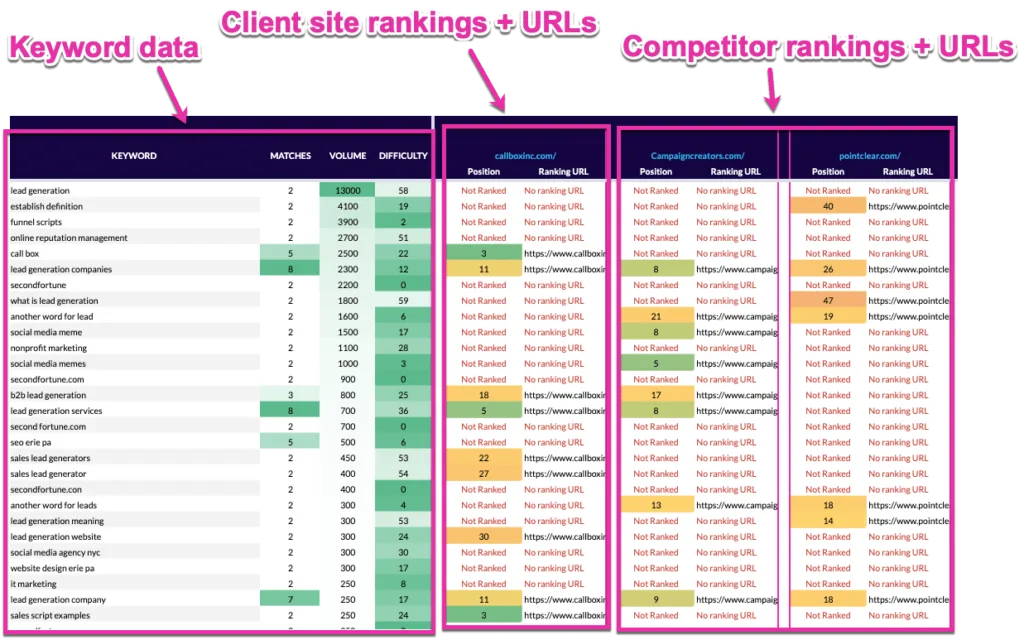
Now pull the actual keyword lists. The easiest way is to enter a competitor's domain into a competitor keyword analyzer and read the terms it ranks for, along with their positions and estimated demand.
The flow looks the same in almost every tool:
- Enter one competitor domain.
- Open the list of organic keywords it ranks for.
- Sort by the keywords that matter to your business, not by traffic alone.
- Open the competitor's top pages and note which topics bring the most search visits.
- Export or copy the list into a spreadsheet, with the competitor's name in one column.
- Repeat for each rival.
If you want a no-cost way to start, the free analyzer is built for exactly this step.
A video walkthrough can help if you prefer to watch the process once before trying it. This one covers free competitive analysis and competitor keyword research.
Paid suites do the same job with bigger databases. Semrush has an Organic Research report, Ahrefs has Site Explorer, and SpyFu is built around competitor research. Free tiers of the paid tools show only a limited slice of keywords, so check each tool's current limits and pricing before you rely on one.
Step 4: Run a keyword gap comparison
A keyword gap compares your site with your competitors and splits the terms into groups. The ones that matter most are keywords rivals rank for that you do not, shared keywords, and keywords only you rank for.
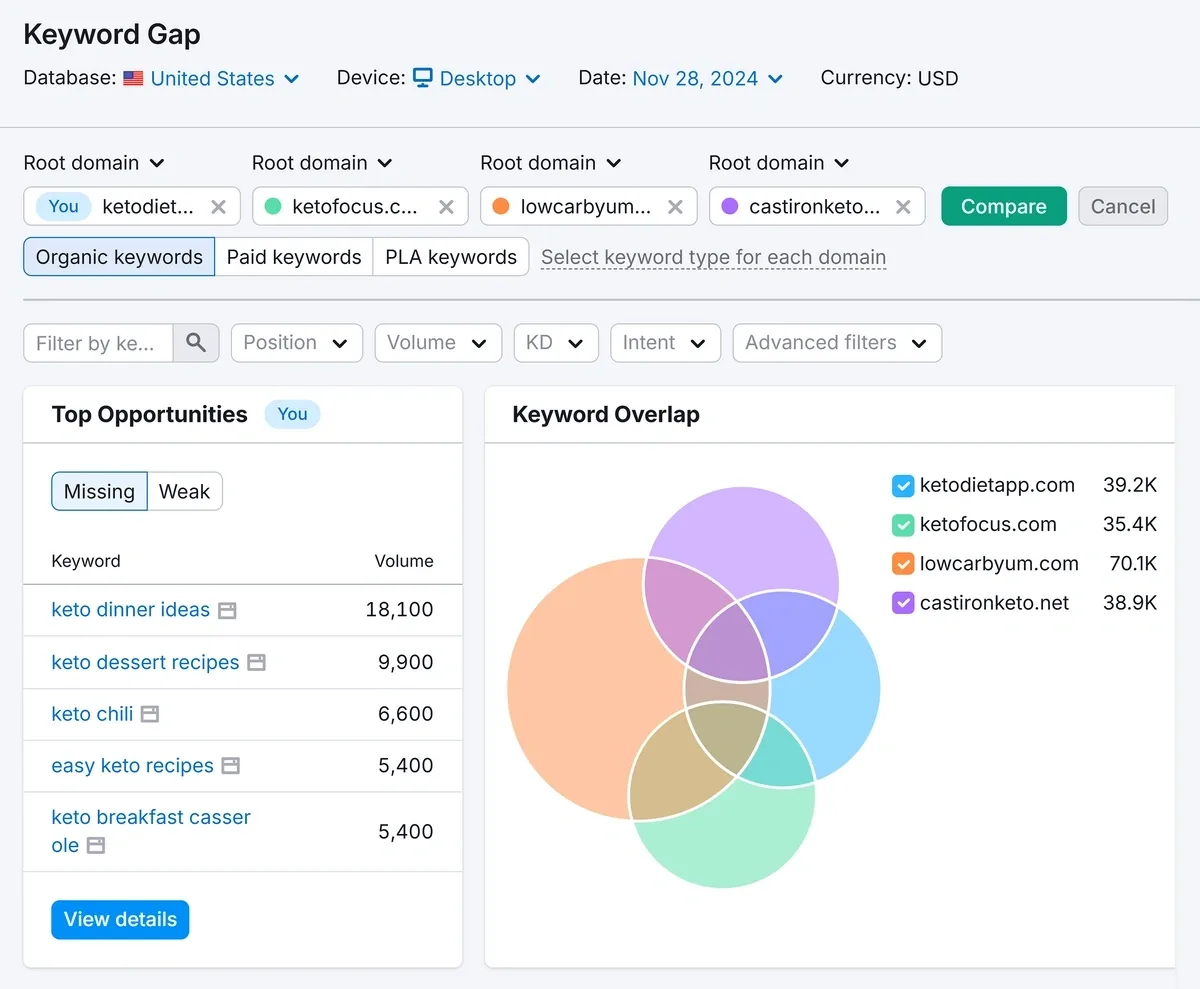
The free keyword gap tool does this comparison between your domain and your rivals. Read the groups like this:
| Gap group | What it means | What to do |
|---|---|---|
| Rivals rank, you do not | Topics you have no page for | Best source of new pages |
| Both rank, rival ahead | You have a page, it is weaker | Improve the existing page |
| Both rank, you are ahead | You already win | Protect it, keep it fresh |
| Only you rank | Your unique strengths | Build on them |
Start with the first two rows. A term where several rivals rank and you do not is a strong signal that the topic matters in your market.
Step 5: Filter the list down to keywords you can win
A raw gap list can have thousands of rows. Most of them are a waste of time. Score every term against five questions:
| Signal | Question to ask | If the answer is no |
|---|---|---|
| Intent fit | Does it match what you sell and who you serve? | Drop it, whatever its volume |
| Ranking position | Is a rival ranking just outside the top 10, say positions 11 to 30, or with a weak page? | It is a harder fight, so move it later |
| Search volume | Are enough people searching to repay the effort? | Skip it, or fold it into a broader page |
| Keyword difficulty | Is the score (0 to 100) one your site can realistically beat? | Sequence it later in your plan |
| Page ownership | Do you already have a page that could cover it? | Create one dedicated page |
Two more cleanup rules. Remove competitor brand names, since you will not win searches for another company's name. And remove terms that are on topic for them but not for you, like a product line you do not sell.
For the difficulty score, run your shortlist through the free keyword difficulty checker. If your site is new or has few backlinks, favor lower-difficulty, more specific phrases first. You can build to the bigger terms once you have pages ranking.
Step 6: Group the keywords and decide what to build
Many of the keywords on your list will mean the same thing. "Emergency plumber near me" and "24 hour plumber" probably belong on one page, not two. The free keyword clustering tool groups similar terms so each cluster gets one page.
Then make a decision for every cluster:
- You already have a page. Update it. Add the missing subtopics, answer the questions rivals answer, and improve the title and headings.
- You have no page. Write one dedicated page aimed at one main keyword and its close variations.
- You have two pages competing. Merge them or differentiate them. The free keyword cannibalization checker helps you find overlaps.
Before you write, open the top results for each keyword and look at what they cover. Your page needs to be more complete, more specific or easier to use than what ranks now, otherwise there is no reason for Google to move you up.
Step 7: Track results and repeat monthly
Rankings change, and competitors publish new pages. Treat this as a cycle, not a one-off project. Once a month, repeat the check:
- Rerun the analyzer for each competitor and note new keywords they have started ranking for.
- Check how your target keywords are moving. The free keyword rank checker lets you look at where you stand for a given term.
- Update pages that stalled, and add new keywords from the gap list.
Keep a simple log so you can see progress. A spreadsheet with these columns is enough:
| Keyword | Cluster | Intent | Difficulty | Rival ranking | Your page | Action | Status |
|---|---|---|---|---|---|---|---|
| water heater repair cost | Water heater | Commercial | Your score | Competitor A, position 14 | None | New page | Planned |
| emergency plumber | Emergency | Transactional | Your score | Competitor B, position 8 | /emergency-plumber | Update | In progress |
Free and paid tools for competitor keyword research
You do not need a big budget to start. Here is how the options compare in practice:
| Tool | Best for | Limits to know |
|---|---|---|
| Google Search Console | Seeing your own queries and pages | Shows only your site, not rivals |
| Rankfly free competitor keyword analyzer | Seeing the keywords a rival domain ranks for | A free tool, not a full suite |
| Rankfly free keyword gap tool | Comparing your site with rivals | A free tool, not a full suite |
| Semrush | Deep keyword gap reports and paid keyword data | Many features can overwhelm beginners; free use is limited |
| Ahrefs | Detailed keyword and page data, big exports | Premium pricing; limited free functions |
| SpyFu | Organic and paid competitor keywords | The free version shows only a small number of keywords |
Pricing changes often, so check each vendor's current plans before you commit. If you only need a starting list this week, the free tools and a spreadsheet are enough.
Common mistakes to avoid
- Analyzing too many competitors. Beyond five, the data turns into a blur. Stay with the rivals who truly share your customers.
- Copying keywords blindly. A term that works for a large site may be out of reach for yours today. Filter by difficulty and intent first.
- Chasing volume alone. A keyword with 5,000 searches that never leads to a customer is worth less than one with 100 searches from buyers.
- Ignoring search intent. If every result for a keyword is a product page, a blog post will not rank. Match the page type.
- Creating duplicate pages. Two pages for the same keyword compete with each other. Map each cluster to one page.
- Doing it once. Competitor keywords change. A monthly check keeps your plan current.
- Stopping at the list. The research only pays off when the keywords become published pages.
Where Rankfly fits
Competitor research gives you a list, but the hard part is turning it into published articles week after week. Rankfly is an SEO autopilot for small businesses and founders. Its keyword research finds keywords your site can realistically rank for, scored for winnability against your site's authority, and builds a 30-day content calendar from them.
From there, Rankfly researches the current top 10 results for each topic and writes one SEO article a day in your brand's voice, with internal links, sources, an FAQ and a featured image. You can see how autoblogging works. It costs $66 a month for 30 articles, with a 3-day free trial, and it is built for small teams that want the work done for them, not a full suite like Semrush or Ahrefs.
Your competitor keyword plan for this week
You can finish the whole process in five short sessions:
| Day | Task | Output |
|---|---|---|
| 1 | Pick 3 to 5 competitors and write 5 to 10 seed keywords | A short list of rivals and seeds |
| 2 | Run each rival through a keyword analyzer | One combined spreadsheet |
| 3 | Run a keyword gap comparison against your site | A list of missing and weaker terms |
| 4 | Filter with the five signals and check difficulty | A shortlist of 15 to 30 keywords |
| 5 | Cluster the shortlist and assign update or new page | A content plan for the next month |
Then publish the first page, and put a monthly reminder in your calendar to repeat the check.
Final thoughts
Competitor analysis keyword research works when you keep the list small, filter hard for intent and winnability, and turn the gaps into real pages. Start with the free analyzer and gap tool this week, build your shortlist, and publish the first page before you do anything else.
Frequently asked questions
How do I see competitor keywords for free?
Enter a competitor's domain into a free competitor keyword analyzer to see the terms it ranks for. Free tiers of paid tools like Semrush and SpyFu also show a limited number of keywords. Google Search Console shows only your own site, so it cannot reveal rival keywords.
How many competitors should I analyze?
Three to five is enough for most businesses. Choose rivals who sell similar products or services to the same customers. More than that adds noise and makes it harder to see the gaps that matter.
What is a keyword gap analysis?
A keyword gap analysis compares your site with competitors and lists the keywords they rank for that you do not. It also shows shared keywords and terms only you rank for. You use the gaps to decide which pages to create or improve.
How do I know which competitor keywords I can actually win?
Check intent fit, difficulty, search volume and whether a rival ranks weakly, for example just outside the top 10. If your site is new, start with more specific, lower-difficulty phrases. Build up to harder terms once you have pages that rank.
How often should I repeat competitor keyword research?
Once a month is a good rhythm for most small businesses. Rankings shift and rivals publish new pages, so a regular check keeps your plan current. Look for new competitor keywords, and check how your own target terms are moving.
About the editorial team
Emma writes Rankfly's guides on SEO, AI search and getting small businesses found on Google and ChatGPT.