Local SEO for Small Businesses: The Complete Guide
What local SEO is, how Google decides who shows up, and the steps that bring in nearby customers. Ends with a plan you can start this week.

Get found by more customers
Rankfly finds the keywords small business can win, then writes and publishes an SEO article every day.
Get my free planKey takeaways
- Local SEO is the work of making your business show up when people near you search for what you sell.
- Google ranks local results on relevance, distance and prominence, so a complete Google Business Profile, consistent listings and reviews come first.
- In a Moz study, 44% of local searchers clicked a local 3-pack listing, so the pack is where much of the attention goes.
- Most local SEO mistakes are basic: unclaimed profiles, mismatched business details, ignored reviews and one page for every service.
- You can cover the essentials in one week, then keep going with local content and tracking.
Table of contents
Local SEO is the practice of optimizing your online presence so your business appears when people in your area search for what you offer. For a small business, the core steps are to claim and complete your Google Business Profile, keep your business details consistent everywhere, collect reviews, and build website pages that match local searches.
This guide covers the full picture: what local SEO is, how Google ranks local businesses, a step-by-step setup, the mistakes that hold most businesses back, the tools worth knowing, and a short plan for this week.
What is local SEO?
Local SEO is a form of search engine optimization that improves a business's visibility in a specific geographic area. It targets searches with local intent, such as "plumber in Austin," "dentist 78704" or "coffee shop near me."
Regular SEO tries to rank a website for a topic anywhere in the world. Local SEO tries to put your business in front of people who can actually walk in or book you. Local SEO sits inside the wider field of SEO, so the basics (good content, a fast site, trustworthy links) still apply.
Local SEO vs regular SEO
| Regular SEO | Local SEO | |
|---|---|---|
| Goal | Rank a site for a topic | Rank a business for a place |
| Typical query | "project management software" | "accountant near me" |
| Main surfaces | Blue links, featured snippets | Google Maps, local 3-pack, blue links |
| Key assets | Content, backlinks | Google Business Profile, reviews, citations, location pages |
| Best for | Online or national businesses | Shops, clinics, offices and service-area businesses |
If customers find you by place, you need both. Local SEO gets you into the map results. Regular SEO work on your site supports it.
Why local SEO matters for small businesses
People use Google to find nearby businesses, and the businesses shown at the top get most of the attention. The map results sit above the regular results, so a business that is not in them is easy to miss.
The local 3-pack is the set of three business listings shown with a map at the top of Google for many local searches. Here is what one looks like:
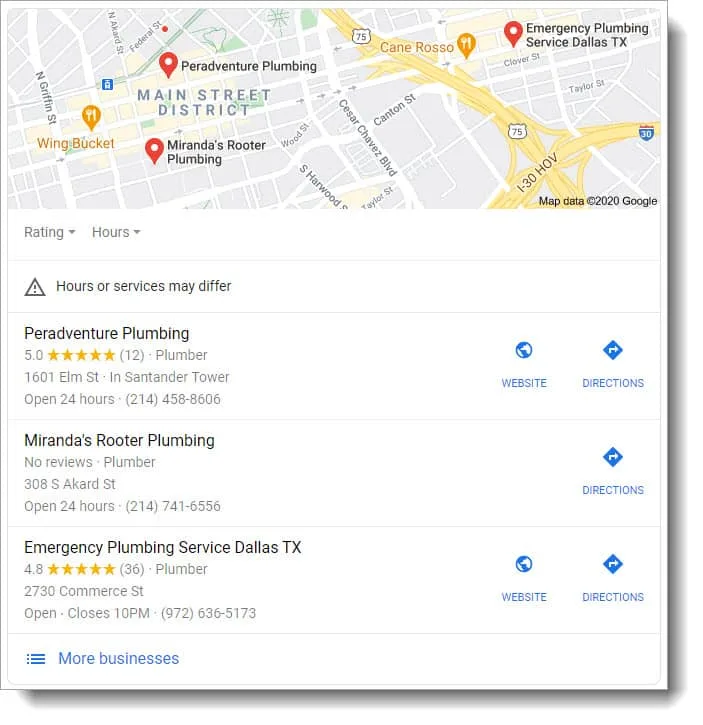
Local searchers also tend to be close to buying. Someone searching "emergency plumber" does not want a guide. They want a phone number. That is why local SEO often brings fewer visitors than broad SEO, but better ones.
It also lets a small business compete with bigger brands. A national chain cannot easily out-rank you for "your neighborhood plus your service" if your profile and reviews are strong.
Who needs local SEO?
Any business that serves customers in a specific place. That includes businesses with a storefront and businesses that travel to customers.
- Restaurants, cafes and retail shops
- Home service companies such as plumbers, electricians and landscapers
- Dentists, doctors, therapists and other medical practices
- Law firms, accountants and real estate agents
- Salons, gyms, auto repair shops and similar local services
If your business has no physical location and no service area, local SEO will not apply, because Google needs a place to tie you to.
How Google ranks local businesses
Google describes local results as based mainly on three factors: relevance, distance and prominence. You can influence two of them directly. You cannot move your office, but you can improve the other two.
| Factor | What it means | What you can do |
|---|---|---|
| Relevance | How well your business matches the search | Pick the right categories, write a clear description, list your services, add matching content to your site |
| Distance | How close you are to the searcher or the location they typed | Make sure your address or service area is accurate. You cannot change the rest. |
| Prominence | How well known and trusted you appear | Earn reviews, keep listings consistent, get mentions and links from local sites |
Because distance is mostly fixed, small businesses win by being more relevant and more prominent than the competitors near them.
How to do local SEO: step by step
Work through these in order. The first three do most of the work for most small businesses.
1. Claim and complete your Google Business Profile
Your Google Business Profile is the free listing that controls how you appear in Google Search and Google Maps. Claim it and verify it first.
Then fill in everything:
- Business name, address, phone number and website
- Opening hours, including holiday hours
- A primary category that matches your main service, plus a few secondary ones
- A short, plain description of what you do and where
- Services or products with short descriptions
- Real photos of your team, location and work
Keep it fresh. Add new photos, post updates about offers or events, and answer questions that customers ask on the profile.
2. Make your business details consistent everywhere
NAP stands for name, address and phone number. Your NAP should be identical on your website, your Google profile and every directory that lists you. Mismatches such as "Street" in one place and "St." in another, or an old phone number, can confuse search engines and customers.
A local citation is any mention of your business details on another site, such as Yelp, Yellow Pages, an industry directory or a local blog. A citation does not need to include a link. Start with the major directories and the ones specific to your industry, and make sure each one is correct. Listing tools can help if you have many directories to keep updated.
3. Ask for reviews and answer all of them
Reviews help you in two ways. They persuade the person reading them, and they act as a prominence signal for Google. A steady flow of recent reviews matters more than a pile from years ago.
Here is how to get more:
- Ask every happy customer, ideally right after the job or visit.
- Send a direct link to your review page by text or email, so it takes one tap.
- Reply to every review. Thank people for good ones. Answer bad ones calmly and offer to fix the issue.
- Never pay for positive reviews or offer rewards only for good ratings. Follow each platform's rules.
A short message you can copy:
Hi [Name], thanks for choosing us today. If you have a minute, a quick Google review helps other people in [City] find us: [link]. Thank you.
4. Do local keyword research
Local keywords combine what you sell with where you sell it. Think in three patterns:
- Service plus city: "water heater repair Denver"
- Service plus neighborhood or zip code: "hair salon Capitol Hill"
- Service plus "near me": "urgent care near me"
Start with your main services and your main service areas. Then look for the questions customers ask, such as "how much does a roof repair cost in Tampa." You can brainstorm with the free keyword generator and see what is realistic with the keyword difficulty checker.
As a small business, pick terms you can actually win. A narrow phrase for your own city is a better target than a broad phrase for your whole state.
5. Build location and service pages on your website
Google needs pages that clearly match the search. A single "Services" page that lists everything is rarely enough.
- Create one page per main service, written for the people in your area.
- If you serve several cities or neighborhoods, create a page for each one with unique content, not the same text with the city name swapped.
- Put your service and city in the title tag, the main heading and the first paragraph, in natural wording.
- Add your address, phone number, hours, a map and real photos.
- Include local proof: jobs you did nearby, local customer stories, and the areas you cover.
Here is a quick before and after for a title tag:
| Before | After |
|---|---|
| Home | Smith Plumbing | Plumber in Austin, TX | Smith Plumbing |
You can check lengths with the title tag checker and write snippets with the meta description generator.
6. Add local business schema
Schema markup is code that tells search engines exactly what your business is, where it is and when it is open. LocalBusiness schema covers your name, address, phone number, hours and more. It will not guarantee rankings, but it removes guesswork. The local business schema generator builds the code for you to paste into your site.
7. Make your site fast and mobile friendly
Many local searches happen on phones. A page that loads slowly or is hard to use on a small screen loses customers before they call. Use a clear layout, a tap-to-call button, readable text and a short contact form.
8. Publish local content and earn local links
Content that answers local questions gives you more ways to be found. Examples include a guide to permits in your city, a seasonal checklist for your area, or a write-up of a project you completed nearby.
Local links also help. Good sources include your chamber of commerce, local sponsors and partners, suppliers, local news and community groups. A few links from relevant local sites are worth more than many from random ones.
Local SEO and AI assistants
People now ask ChatGPT, Gemini, Claude and Perplexity for recommendations too, including "best dentist in Portland" style questions. These assistants pull from information they can find about you across the web, so many of the same basics help: accurate business details, reviews, clear service pages and mentions on trusted sites.
It is worth checking what these tools say about your business. The free AI visibility checker is a quick way to start, and our guide to GEO vs SEO explains what changes and what stays the same.
Common local SEO mistakes
| Mistake | Why it hurts | Fix |
|---|---|---|
| Profile not claimed or not verified | Someone else can edit it, and you cannot manage it | Claim and verify it first |
| Inconsistent name, address or phone | Weakens trust with search engines and confuses customers | Audit your top directories and correct every mismatch |
| Wrong or too many categories | Shows you for the wrong searches | Pick one precise primary category |
| Ignoring reviews | Loses trust and a prominence signal | Ask regularly and reply to every review |
| One page for every service and city | Nothing matches the specific search | Create focused service and location pages |
| Copy-pasted city pages | Thin, repetitive pages add little value | Write unique content with local proof for each page |
| Targeting terms that are too competitive | You do not rank, so you get no traffic | Start with narrow, winnable local phrases |
| Never checking results | You cannot tell what works | Track rankings and calls monthly |
Local SEO tools worth knowing
You can do most local SEO with free tools. Paid tools save time once you have many locations or listings.
| Tool | Best for | Notes |
|---|---|---|
| Google Business Profile | Your main local listing | Free and essential |
| Google Search Console | Seeing which searches show your site | Free |
| Moz Local, Synup | Managing listings and citations across directories | Check current pricing |
| BirdEye, Podium | Collecting and answering reviews | Check current pricing |
| Semrush, Ahrefs | Keyword research and competitor analysis | Full SEO suites, built for specialists |
| Free keyword rank checker | A quick look at where you rank for a term | Free |
| Rankfly | Researching, writing and publishing the website content for you | Built for small teams. Not a full SEO suite, and it does not manage your Google profile or reviews. |
A local SEO plan for this week
You do not need a month. Spend about an hour a day and cover the essentials.
- Day 1: Google Business Profile. Claim, verify and complete every field. Add at least five real photos.
- Day 2: Business details. Write down your exact NAP. Fix your website, then the top directories.
- Day 3: Reviews. Send your review link to your last ten happy customers and reply to every existing review.
- Day 4: Keywords. List your three main services and your main service areas. Pick one target phrase per page.
- Day 5: Pages. Update your title tags, headings and opening text for your main service pages. Add your address, hours and a map.
- Day 6: Schema and mobile. Add local business schema and test your site on your phone.
- Day 7: Plan the next month. Choose local topics to publish and write down where you rank today so you can compare later.
After week one, keep a monthly routine: new photos and a post on your profile, a few new reviews, one or two new local pages or articles, and a check of your rankings and calls.
Where Rankfly fits
The slowest part of local SEO for most owners is the ongoing content. Rankfly is an SEO autopilot that finds keywords your site can realistically win, plans a 30-day content calendar, and then writes and publishes one SEO article a day in your brand's voice, with internal links, sources, an FAQ and a featured image. You can approve each article first in review mode.
It also tracks whether ChatGPT, Claude, Gemini and Perplexity recommend you, and turns the gaps into articles. Plans are $66 a month for 30 articles, with a 3-day free trial. Your Google Business Profile and reviews are still yours to manage, but the website content does not have to be.
Final thoughts
Local SEO comes down to three things: a complete Google Business Profile, consistent details and reviews, and website pages that match what nearby customers search for. Do the week-one plan, then keep adding local content and checking your results each month.
Frequently asked questions
What is local SEO for a small business?
Local SEO is the process of improving your visibility in searches tied to a place, such as "florist in Boise" or "mechanic near me." For a small business it mainly means a complete Google Business Profile, consistent listings, reviews and location-focused website pages.
How much does local SEO cost?
It depends on how much you do yourself. The core tools, such as Google Business Profile, are free, and the main cost is your time. Agencies and software vary widely, so check current pricing, and try the free SEO cost calculator on Rankfly to estimate a budget.
How long does local SEO take to work?
Some changes, like fixing your profile or adding reviews, can matter within weeks. Ranking for competitive terms with new website pages usually takes longer, and results vary by market and competition. Treat it as ongoing work rather than a one-time project.
Do I need a website for local SEO?
You can appear in Google Maps with only a Google Business Profile, but a website gives you far more ways to rank and convert. Service pages, location pages and local content all depend on having a site you control.
What is the difference between local SEO and Google Business Profile optimization?
Google Business Profile optimization is one part of local SEO. Local SEO also includes citations and listings, reviews, local keyword research, website pages, schema markup and local links.
Does local SEO help me show up in ChatGPT and other AI assistants?
It can help. AI assistants draw on information about your business from across the web, so accurate details, reviews and clear service pages all support being recommended. You can check what they say about you with a visibility checker and fill gaps with content.
About the editorial team
Emma writes Rankfly's guides on SEO, AI search and getting small businesses found on Google and ChatGPT.