Title Tag SEO: How to Write Titles That Get Clicks
A title tag is the clickable headline of your page in Google. Here is how to write one: five steps, eight copy-paste formulas, length rules, mistakes to avoid and a plan for this week.

Try the free title tag checker
Free, no sign-up. Then let Rankfly research, write and publish the articles that rank.
Use the free toolKey takeaways
- A title tag is the HTML element that names your page, and it is the headline people click in Google results.
- Put one primary keyword near the front, add a clear reason to click, and aim for about 50 to 60 characters so it is not cut off.
- Give every page a unique title; duplicate, vague or keyword-stuffed titles are the most common reasons Google rewrites them.
- Keywords in titles are a small ranking signal, but a better title earns more clicks from the position you already have.
- Start with your top 10 to 20 pages, rewrite their titles with a formula, then check click-through rate in Google Search Console.
Table of contents
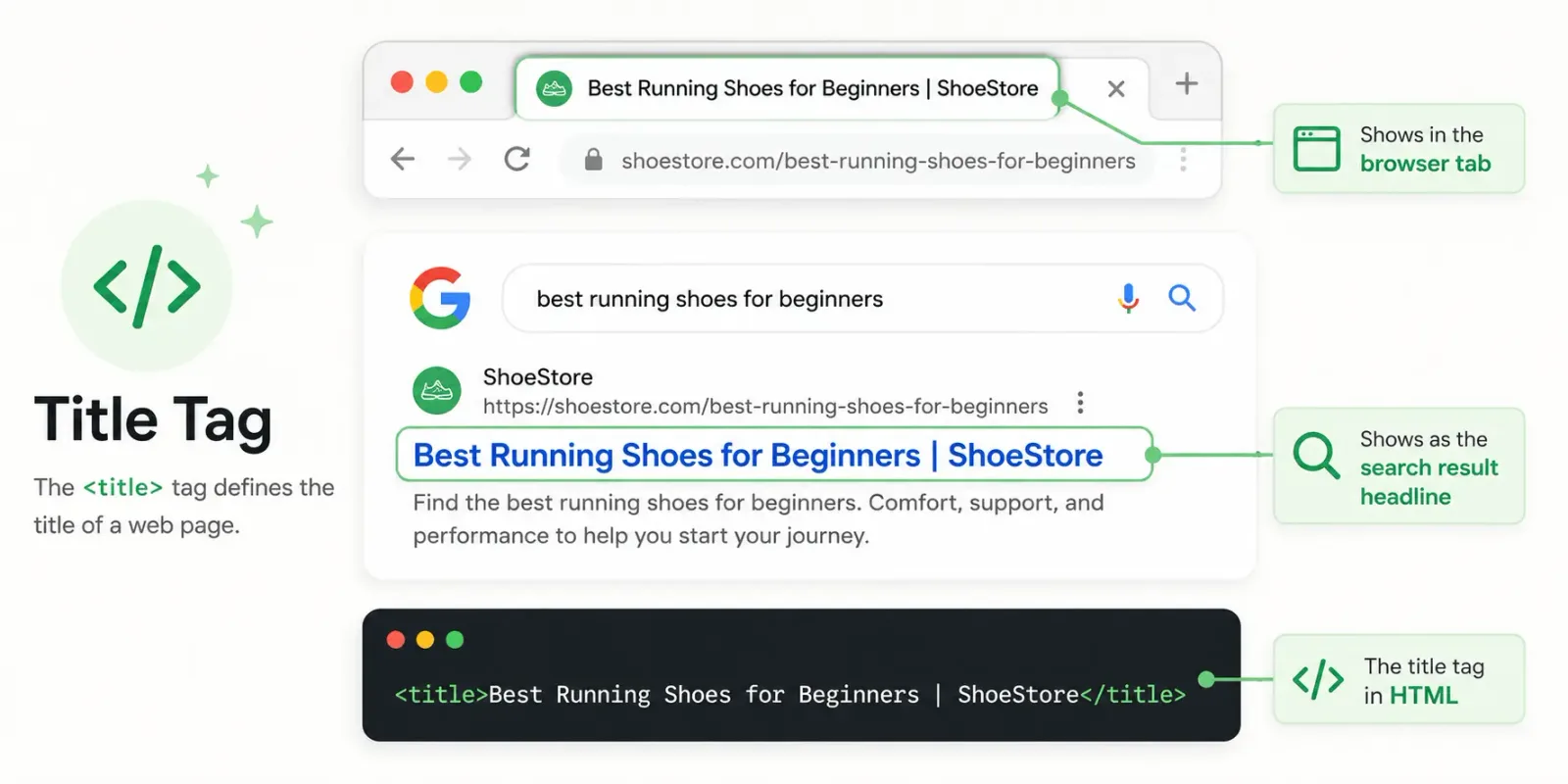
A title tag is the HTML element that sets the title of a web page. It appears as the blue clickable headline in Google results, and the best ones lead with the target keyword, promise a clear benefit and fit in roughly 50 to 60 characters.
This guide covers the definition, why title tags still matter, a five-step writing process, eight copy-paste formulas with examples, length rules, common mistakes, tools and a plan you can finish this week.
What is a title tag?
A title tag is an HTML element, written as <title>, that tells browsers, search engines and social apps what a page is called. It lives in the <head> of the page, and each page should have exactly one.
<head>
  <title>Title Tag SEO: How to Write Titles That Get Clicks</title>
</head>
You will also see it called the page title, meta title or SEO title. In practice these mean the same thing. The title tag is not shown inside the page body. That job belongs to the H1, which we cover below.
A title appears in four main places:
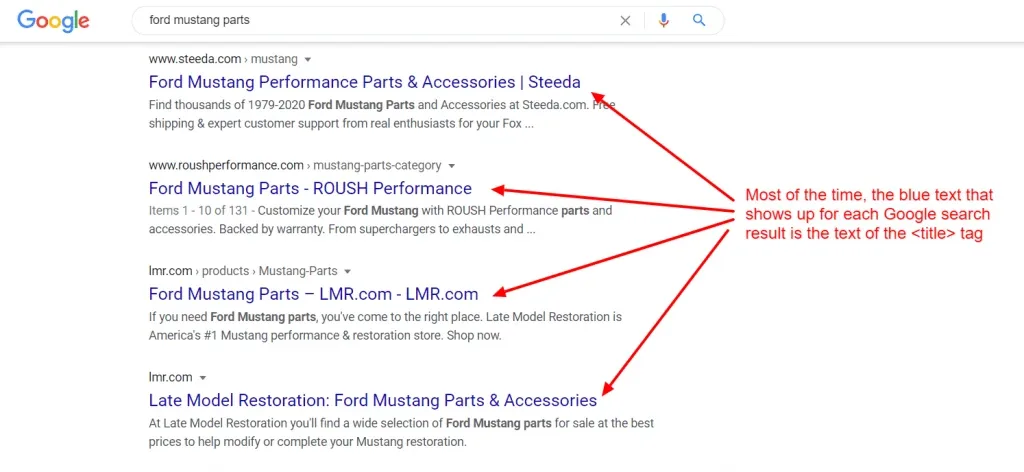
- Google results: the large blue clickable headline above the description.
- Browser tabs: the label on each open tab.
- Shared links: social networks, text messages and messengers use the title tag by default unless you set a separate Open Graph title.
- Bookmarks: the saved name of your page in a visitor's browser.
If you prefer to watch, this short overview covers the basics in two minutes:
Do title tags still matter for SEO?
Yes, for two reasons: relevance and clicks. A title tells search engines what a page is about, and it is the first thing a searcher reads before deciding to visit.
The ranking effect is real but small. KlientBoost's title tag guide reports that Moz and Brian Dean both found a weaker link between exact keywords in titles and rankings than in the past. The keyword in the title looks like a ticket to page one, but repeating the exact phrase does not seem to push you higher once you are there. So include the keyword, then spend your effort on the part that earns the click.
Click-through rate is where titles pay off. Whether Google uses clicks as a ranking signal is debated: Moz published data suggesting it does, while Google has denied it. You do not need to settle that argument. A title that earns more clicks from the same position brings more visitors either way.
How to write a title tag in 5 steps
This is the process to follow for every page. It takes about two minutes once you have the keyword.
1. Pick one primary keyword and check its intent
Each page gets one main keyword. Search it, look at what ranks, and decide whether people want a guide, a list, a product or a local provider. That intent shapes the wording of your title.
If two of your pages target the same phrase, they compete with each other. Run both through the keyword cannibalization checker and give each page its own focus.
2. Put the keyword at the front
Lead with the phrase people searched. KlientBoost cites research showing many visitors scan only the first couple of words of a title, so the opening words do the most work. Use the keyword as a natural phrase rather than a string of separate terms.
3. Add a reason to click
A keyword alone describes the page. A reason to click sells it. Pick one:
- A number: "7 Steps", "9 Tools"
- A year, if you really update the page: "(2026)"
- A benefit: "Free Download", "Without Paying Per Lead"
- Proof: ratings, review counts, awards
- A local qualifier: city, county, "Near Me" intent
- An offer: "Free Returns", "Free Quote"
One reason is enough. Two or three crowd the title and read like spam.
4. Fit the length and preview it
Aim for about 50 to 60 characters, then look at how it will appear. A SERP preview tool shows the truncation risk before you publish. More on length in a moment.
5. Add your brand last and make the title unique
Place the brand name after a separator such as a pipe or colon, unless it is your homepage, where the brand usually goes first. If the brand eats space the title needs, drop it. Never reuse a title across pages.
8 title tag formulas with examples
Copy a formula, swap in your keyword and adjust it to the intent of the page. The examples use fictional brands.
| # | Formula | Example | Best for |
|---|---|---|---|
| 1 | Keyword: Benefit | Brand | Invoice Template for Freelancers: Free Download | Billwise | Resources, landing pages |
| 2 | How to + Keyword: Number + Outcome | How to Write a Title Tag: 7 Steps and Examples | Tutorials |
| 3 | Best + Category + Audience: Number (Year) | Best CRM for Small Business: 9 Tools Compared (2026) | Listicles, comparisons |
| 4 | Service + City, Qualifier | Brand | Emergency Plumber in Denver, 24/7 | Mile High Plumbing | Local service pages |
| 5 | Product + Attribute | Offer | Brand | Men's Waterproof Hiking Boots | Free Returns | TrailCo | Ecommerce product pages |
| 6 | What Is Keyword? Definition and Examples | What Is a Title Tag? Definition and Examples | Definition posts |
| 7 | A vs B for Goal: Verdict or Year | Squarespace vs Wix for SEO: Which Is Better in 2026? | Comparisons |
| 8 | Brand + Reviews: Proof | Mile High Plumbing Reviews: [X] Stars from [N] Customers | Reviews pages |
Formula 8 comes from a simple idea in the KlientBoost guide: if people search "business name + reviews", put your star rating or review count in the title. Use your real numbers, never placeholders.
Match the formula to the intent
A contact page searcher wants to reach you, so mention how they can (phone, form, hours). An about page can include an award or credential. A product page should name the product and one reason to buy. The point is the same each time: tell the searcher what they get by clicking.
Before and after
| Before | What is wrong | After |
|---|---|---|
| Home | Vague, no keyword | Mile High Plumbing: Emergency Plumber in Denver |
| Plumber Denver | Plumber Near Me | Best Plumber Denver CO | Emergency Plumber | Mile High Plumbing Services | Keyword stuffing, over 100 characters | Emergency Plumber in Denver, 24/7 | Mile High Plumbing |
| Cheap products for sale | Same title on every page, no detail | Men's Waterproof Hiking Boots | Free Returns | TrailCo |
Google's own guidance warns against keyword-stuffed titles and against vague titles that repeat across a site. You can read it in Google's help page on titles and snippets.
If you want a starting point, the SEO title generator produces variations from your keyword. Treat the output as drafts and edit them for your audience.
How long should a title tag be?
Aim for about 50 to 60 characters, which is roughly 600 pixels on desktop results. Longer titles may be cut off with an ellipsis, so put the important words first.
There is no official Google limit. KlientBoost quotes Google's Gary Illyes saying Google does not have a recommended title length and that the number is an "externally made-up metric". He also said a longer title can still be useful. The practical rule: be concise if you can, and do not cut meaning just to hit a number. Search Engine Journal covers this question in more detail.
Here is how the earlier examples measure up:
| Title | Characters |
|---|---|
| Title Tag SEO: How to Write Titles That Get Clicks | 50 |
| How to Write a Title Tag: 7 Steps and Examples | 46 |
| Best CRM for Small Business: 9 Tools Compared (2026) | 52 |
| Emergency Plumber in Denver, 24/7 | Mile High Plumbing | 54 |
Width matters as much as count. A title full of capital letters or a letter like W takes more pixels than the same number of narrow letters. Check the final version with the character count checker or the title tag checker linked above.
Title tag vs H1 vs meta description
These three get mixed up all the time. Each has a different job.
| Element | Where it shows | Main job | Ranking factor? |
|---|---|---|---|
| Title tag | Google results, browser tab, shared links | Name the page and earn the click | Yes, a small one |
| H1 | At the top of the page itself | Tell visitors what the page is about | Helps structure and relevance |
| Meta description | Under the title in Google results | Short pitch that supports the click | No |
The title tag and H1 can be identical, and often they are for simple pages. They can also differ: the title can be tighter and keyword-first, while the H1 reads more conversationally. Keep them clearly about the same topic. Check your headings with the heading tag checker, and keep your descriptions under about 160 characters with the meta description length checker.
Why Google rewrites your title tag
Google can replace your title in results when it thinks another version describes the page better. This is normal, and it does not mean your page is penalized. Moz has a breakdown of the ways Google rewrites titles.
These are the usual triggers:
- The title is far too long and gets trimmed.
- The title is stuffed with repeated keywords.
- The title is boilerplate, the same pattern on many pages with little that is specific.
- The title does not match what the page is actually about.
- The title is missing, empty or just says something like "Home".
The fix is the same each time: write a short, specific, accurate title that matches the page and its H1. If Google still rewrites it, check whether its version is better. Sometimes it is, and you can borrow the wording.
7 common title tag mistakes
- Duplicate titles. Every page needs its own. Use your crawler or the checker to find repeats.
- Keyword stuffing. One keyword, or one close variation, is plenty.
- No keyword at all. A clever title that never names the topic gives search engines little to work with.
- Brand first on every page. It pushes the keyword out of the visible space. Save brand-first for the homepage.
- Vague titles. "Services" and "Products" tell nobody anything.
- Ignoring local intent. Local businesses should include the city or area on service pages.
- Never testing. Titles are not one-and-done. Review them against click-through data and adjust.
Tools for writing and checking title tags
| Tool | What it does | Best for |
|---|---|---|
| Rankfly Title Tag Checker | Reads a page's title and flags length and other issues | Quick checks on a single URL |
| SEO plugins (Yoast SEO, Rank Math, All in One SEO) | Edit the SEO title per page in WordPress with a preview | WordPress sites |
| Google Search Console | Shows clicks, impressions and click-through rate per page | Finding titles that underperform |
| ChatGPT or similar | Brainstorms variations from a keyword and page topic | First drafts you then edit |
| Rankfly | Researches, writes and publishes articles for you | Small teams that do not want to write every page themselves |
Rankfly is built for small teams that want content researched, written and published for them. It is not a full SEO suite like Semrush or Ahrefs, so it will not replace a crawler or backlink database.
How to change a title tag on your site
In raw HTML, edit the <title> line in the <head>. In WordPress, an SEO plugin gives you a title field on each post and page. By default WordPress builds a title from the post title and site name, which is why plugins are the safer route than editing theme files. Most other site builders have an "SEO title" field in page settings.
Your title tag plan for this week
You do not need to fix every page. Start with the ones most likely to move.
| Day | Task |
|---|---|
| Monday | List your top 10 to 20 pages in a spreadsheet with the target keyword for each. |
| Tuesday | Run each URL through the title tag checker. Note length, duplicates and missing keywords. |
| Wednesday | Rewrite titles for your top five pages using the formulas above. |
| Thursday | Preview each in a SERP tool, trim to fit and update the titles on your site. |
| Friday | Write down the date and the old and new titles. Repeat for the next batch. |
Then wait a few weeks and compare click-through rate for those pages in Google Search Console. Change one thing at a time so you know what caused any difference. For the bigger picture on page-level writing, see our guide to content SEO writing.
When writing every title is too much work
Titles are a small job, but a site with 50 pages has 50 of them, plus the content behind each. Rankfly researches the current top 10 results for a keyword and writes one SEO article a day in your brand's voice, then publishes it to your site. Review mode lets you approve each article first, so you stay in control of what goes live.
It costs $66 a month for 30 articles, with a 3-day free trial and cancel-anytime billing.
Final thoughts
A good title tag names the page clearly, leads with the keyword and gives the searcher one reason to click. Use a formula, keep it near 50 to 60 characters and make every title unique. This week, rewrite your top five pages and check the results in Search Console.
Frequently asked questions
How to make a SEO title?
Start with one primary keyword, put it near the front, then add one reason to click such as a number, benefit or local qualifier. Keep it around 50 to 60 characters, make it unique to the page and add your brand at the end if there is room. Preview it before you publish.
What is a title tag in HTML?
A title tag is the `<title>` element inside a page's `<head>` that defines the page's name. Browsers show it in the tab, search engines use it as the headline in results and many apps use it when a link is shared. Each page should have one.
Is SEO still relevant in 2026?
Yes. People still search on Google, and AI assistants still rely on clear, well-structured web pages to find answers. Basics like specific titles, useful content and a crawlable site still decide whether you get found.
What are SEO tags?
SEO tags are HTML elements that tell search engines and users about a page. The main ones are the title tag, meta description, heading tags (H1 to H6), canonical tag, robots meta tag and image alt text. The title tag matters most because it is the headline in search results.
What are the 3 C's of SEO?
There is no single official answer, and different writers define them differently. A common version is content, code and credibility: what the page says, how well the site works technically, and the authority it earns from links and brand. Title tags sit mostly under content, since they describe the page and attract the click.
About the editorial team
Emma writes Rankfly's guides on SEO, AI search and getting small businesses found on Google and ChatGPT.