Squarespace vs Wix for SEO and Blogging (2026)
A plain comparison of Squarespace and Wix for SEO, blogging and price, with a features table, a pick for each type of reader, and how to publish content on autopilot.

Publish an SEO article every day, on autopilot
Rankfly researches, writes and publishes to WordPress, Shopify, Webflow, Wix and more. $66/month.
See how it worksKey takeaways
- Wix gives you more SEO controls, more apps and a free plan to start; Squarespace gives you a cleaner editor, polished templates and built-in SEO basics.
- Neither builder decides your rankings. Consistent, useful content decides them, and both platforms can host it.
- Squarespace is cheaper to start selling online ($19 vs $29 a month, billed annually), while Wix has the cheapest plan for a simple site ($17).
- Rankfly publishes straight to Wix. Squarespace is not one of the platforms it connects to, so articles would need to be copied in by hand.
Table of contents
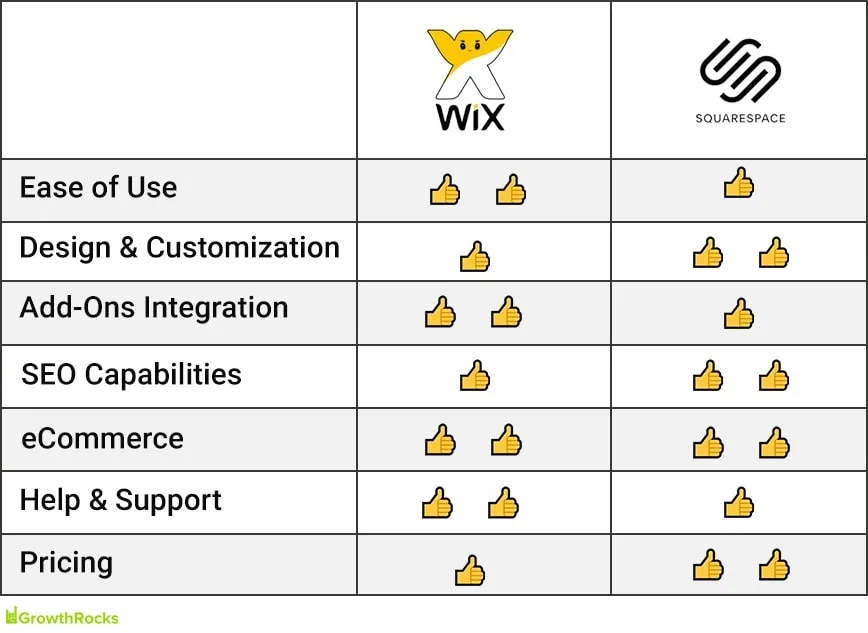
Wix is the better choice for SEO and blogging if you want more technical controls, a bigger app store and a cheap way to start. Squarespace is the better choice if you want a cleaner editor, more polished templates and solid SEO basics built in. Both can rank on Google, because rankings depend far more on your content than on the builder.
Here is the short version. Pick Wix for flexibility and control. Pick Squarespace for design and simplicity. If your real goal is traffic from Google and AI assistants, the builder matters less than whether you publish helpful articles every week.
Squarespace vs Wix: the quick verdict
- Best for SEO control: Wix. It offers advanced technical SEO controls such as robots.txt editing, bulk redirects and structured data, according to LitExtension's comparison.
- Best for built-in SEO basics: Squarespace. XML sitemaps, schema markup and clean URLs come built in.
- Best for blogging features: a tie. Wix adds monetization, member content and forums. Squarespace adds paywalls, subscriptions and strong content management.
- Best for price: it depends. Wix is cheapest for a simple site. Squarespace is cheaper if you want to sell online or need a top-tier plan.
- Best for beginners: a tie, with Squarespace slightly more foolproof because its editor is section based.
Squarespace vs Wix comparison table
This table puts the features that matter for SEO, blogging and budget side by side. Prices are per month, billed annually, and come from the research cited below.
| Wix | Squarespace | |
|---|---|---|
| Plan price range | $17 to $159 | $19 to $99 |
| Cheapest plan that sells online | Core, $29 | Basic, $19 (2% transaction fee) |
| Free plan | Yes, with ads | No, 14-day free trial |
| Templates | 2,000+ (one review counts 3,100+) | About 190 (one review counts 202) |
| Technical SEO controls | robots.txt, bulk redirects, structured data | XML sitemaps, schema markup, clean URLs built in |
| Blogging extras | Monetization, member content, forums | Paywalls, subscriptions, content management |
| Apps and integrations | 500+ apps | 55 extensions |
| Support | 24/7 callback (English), live chat in 10 languages | 24/7 email, weekday live chat, no phone |
| Best for | Small businesses that want control and a large app store | Creatives and brands that want a polished, simple site |
Source for most rows: LitExtension. Template counts vary between reviewers, so treat them as ballpark figures.
If you prefer to watch a walkthrough before reading on, this video compares the two builders side by side.
Squarespace vs Wix for SEO
Both platforms cover the basics Google needs: crawlable pages, sitemaps, editable titles and descriptions, and mobile-friendly layouts. The difference is how much you can tune beyond the basics. Wix gives you more levers. Squarespace gives you good defaults and fewer decisions.
Technical SEO controls
Wix offers advanced technical SEO controls, including robots.txt editing, bulk redirects and structured data, per LitExtension. That helps if you migrate a site, restructure URLs or want to mark up products and FAQs. If you edit robots.txt, check it afterward with the free robots.txt checker so you do not block pages by accident.
Squarespace builds in the essentials: XML sitemaps, schema markup and clean URLs. You do less setup, which is a plus for small teams that do not want to touch technical settings. Whichever platform you use, you can confirm your sitemap works with the XML sitemap validator.
Mobile experience and speed
Google ranks pages using page experience signals, including the Core Web Vitals described at web.dev. Mobile layout and load speed both feed into that.
Squarespace sites are fully responsive by default. Wix now offers a responsive experience through its newer Harmony editor, but many Wix templates can only be edited in the classic Wix Editor. That editor uses absolute positioning and separate desktop and mobile layouts, and those sites cannot be moved to Harmony. One review also scored Squarespace higher on site speed and reliability, so check your own pages with a speed test whichever builder you choose.
On-page basics
On both platforms you can set page titles, meta descriptions, image alt text and URL slugs. These are the settings that most affect how your pages show up in search results. Writing them well matters more than which dashboard you click through.
- Keep titles specific and put the main keyword near the start.
- Write a meta description that gives a reason to click. The meta description generator can draft one in seconds.
- Use short, readable URLs.
- Add alt text to images that carry meaning.
AI tools that touch SEO
Both builders now include AI helpers. Reviewers report that Wix's AI tools can suggest SEO improvements, write blog posts and show where your site is mentioned by AI engines. Squarespace's AI can generate metadata, alt text and blog text, and it can match your brand's tone of voice. Treat any AI draft as a starting point. It still needs your facts, examples and editing.
SEO features compared
| SEO need | Wix | Squarespace |
|---|---|---|
| Edit robots.txt | Yes | Check current settings |
| Bulk redirects | Yes | Check current settings |
| Structured data | Yes, advanced controls | Schema markup built in |
| XML sitemap | Built in | Built in |
| Mobile layout | Responsive on Harmony, classic editor is not | Fully responsive by default |
| AI help for SEO text | Yes | Yes, including metadata and alt text |
| Best fit | People who want to tune details | People who want sensible defaults |
The honest summary: Wix wins on depth, Squarespace wins on simplicity, and neither one will rank a thin site. A page about a topic that nobody searches for will not rank because it sits on the right platform.
Blogging on Wix vs Squarespace
Both platforms include a built-in blog, and both are enough for a business blog that publishes a few times a week. The gap shows up in what you can do with the blog once it grows.
Wix adds monetization options, member-only content and forum features. That suits communities, creators and anyone who wants readers to sign in. Squarespace focuses on paywalls, subscriptions and strong content management. That suits newsletters, courses and paid content.
For pure SEO blogging, the practical points are these:
- Categories and URLs. Keep post URLs short and avoid changing them later.
- Internal links. Link each new post to related posts and key pages.
- Publishing rhythm. Search traffic grows from many useful pages, not a few.
- Editing workflow. Pick the editor you will actually open each week.
If you are comparing platforms purely for blogging, a dedicated CMS like WordPress is also worth a look. It is a common choice for content-heavy sites, though it needs more setup and upkeep than either builder. For a robots.txt example there, see the WordPress robots.txt guide.
Squarespace vs Wix pricing
Wix is cheaper if you want a simple site. Squarespace is cheaper if you want to sell online or need the top plan. These are the annual-billing prices from LitExtension.
| Plan level | Wix (per month, annual) | Squarespace (per month, annual) | Squarespace (per month, monthly billing) |
|---|---|---|---|
| Entry | Light, $17 | Basic, $19 | $25 |
| Second | Core, $29 | Core, $29 | $39 |
| Third | Business, $39 | Plus, $49 | $65 |
| Top | Business Elite, $159 | Advanced, $99 | $139 |
Source: LitExtension. Wix's Light plan does not support online payments, so you need Core or higher to sell. Squarespace's Basic plan carries a 2% transaction fee, while Core and above have 0%.
A few other points on cost:
- Free plans. Wix has a free plan that shows ads and cannot use a custom domain, so it is fine for a test site but not for a business. Squarespace has no free plan, only a 14-day trial.
- Paying monthly. Squarespace annual billing works out roughly a quarter cheaper than month-to-month.
- Price changes. Reviewers disagree on current numbers, and LitExtension notes a Squarespace price increase in 2026. Check both pricing pages before you buy.
Asking whether Wix is really free forever? The free plan can run indefinitely, but it is ad-supported and limited, so most businesses end up on a paid plan.
Templates and design
Wix wins on quantity and Squarespace wins on polish. Wix offers 2,000+ templates sorted by type and industry, and it can also generate a design with its AI builder. Squarespace offers a much smaller set, but reviewers often rate its designs as the best looking of the two.
One thing to know before you commit: on both platforms, switching templates after launch is a hassle, so choose carefully. Design also affects SEO indirectly. A clear layout that loads fast and reads well on a phone keeps people on the page.
Ease of use, apps and support
Both editors are beginner friendly. Wix gives you near pixel-level control, which is great if you know what you want and easy to overdo if you do not. Squarespace uses pre-made sections that make it hard to build an ugly page.
On apps, Wix has 500+ against Squarespace's 55 extensions. If you need a specific booking, forms or marketing tool, Wix is more likely to have it. On support, Wix offers 24/7 callback support in English and live chat in 10 languages, while Squarespace offers 24/7 email, weekday live chat and no phone line.
What is the downside to each platform?
Squarespace downsides:
- Smaller template library, around 190 templates.
- Fewer apps and integrations, 55 extensions.
- No phone support and weekday-only live chat.
- No free plan, only a 14-day trial.
Wix downsides:
- The cheapest plan cannot take online payments.
- Many templates sit on the classic, non-responsive editor.
- Wix's design freedom can lead to inconsistent pages.
- Higher tiers get expensive, up to $159 a month.
Which should you choose?
Choose based on how you work and what you sell, not on a score. This table gives a pick for each type of reader.
| If you are... | Choose | Why |
|---|---|---|
| A local business that wants more control over SEO settings | Wix | Robots.txt, bulk redirects and structured data are available |
| A photographer, designer or studio | Squarespace | Polished templates and a clean editor |
| Selling a few products on a tight budget | Squarespace | Cheaper entry for selling, from $19 a month annually |
| Selling many products with global payments | Wix | More payment providers and ecommerce tools |
| Testing an idea for free | Wix | Free plan available |
| Running a paid newsletter or gated content | Squarespace | Paywalls and subscriptions are a core feature |
| Building a community with member logins | Wix | Member content and forums |
| A beginner who wants few decisions | Squarespace | Section-based editor keeps designs tidy |
If you run a small business and want more help getting started with search, see SEO for small businesses.
The third option: stop doing the content work yourself
The builder is only the container. What drives traffic is a steady stream of articles that answer the questions your customers search for. That is the part most small teams stall on, and it is the part neither Wix nor Squarespace does for you.
Rankfly is an SEO autopilot built for that. It researches the current top results for a keyword, writes one SEO article a day in your brand's voice with internal links, sources, an FAQ and a featured image, and publishes it for you. It can publish straight to Wix, and a review mode lets you approve each article first. Here is the honest limit: Squarespace is not one of the platforms Rankfly connects to, so on Squarespace you would copy articles in yourself. It is also not a full SEO suite like Semrush or Ahrefs. Plans cost $66 a month for 30 articles, with a 3-day free trial.
If you have not chosen a builder yet and plan to publish content on autopilot, that is a practical reason to lean toward Wix. For more on writing content that ranks, read the content SEO writing guide.
You can see plan details on the pricing page.
Final thoughts
Wix is the stronger pick for SEO control, apps and a low-cost start. Squarespace is the stronger pick for design, simplicity and cheaper selling. Choose the one you will enjoy using, then spend your energy on publishing helpful content, because that is what moves rankings.
Frequently asked questions
How much does Squarespace cost compared to Wix?
Billed annually, Wix plans run from $17 to $159 a month and Squarespace plans run from $19 to $99 a month, per LitExtension. Wix is cheaper for a simple site, while Squarespace is cheaper to start selling online ($19 vs $29) and at the top tier. Prices change, so check both pricing pages before you buy.
Which is better for blogging, Wix or WordPress?
Wix is easier to set up and bundles hosting and design in one place. WordPress is a common choice for content-heavy blogs because it offers more flexibility, but it needs more setup and maintenance. If you want the simplest path, pick Wix; if you want maximum control over a large blog, consider WordPress.
Is Wix really free forever?
Wix has a free plan you can keep using indefinitely, but it shows ads, does not support ecommerce and does not allow a custom domain. That makes it fine for testing, not for a business. Paid plans start at $17 a month billed annually.
What is the downside to Squarespace?
Squarespace has a smaller template library (around 190), fewer apps (55 extensions), no phone support and no free plan, only a 14-day trial. It also gives you less design freedom than Wix. For many people those trade-offs are worth it for the cleaner editor.
Is Wix or Squarespace better for SEO?
Wix offers more technical controls, including robots.txt editing, bulk redirects and structured data. Squarespace builds in sitemaps, schema markup and clean URLs, so there is less to set up. Both can rank, because content quality and consistency matter more than the platform.
Can Rankfly publish to Squarespace?
No. Rankfly publishes automatically to Wix, WordPress, Shopify, Webflow, Framer, Ghost, Notion and anything with a webhook or REST API, but Squarespace is not one of its connections. On Squarespace you would copy each article in yourself.
About the editorial team
Emma writes Rankfly's guides on SEO, AI search and getting small businesses found on Google and ChatGPT.